
Colors and theming in vizzy
Styling is optional — diagrams render cleanly with none. When you do tint a node, prefer a
standard color name over a raw #hex — names stay on-theme and let a single
vizzy.config retheme the whole repo at once. Never invent a custom token.
The palette
Section titled “The palette”red orange yellow green mint teal cyanblue indigo purple pink brown gray black white(plus primary, secondary, and accent). A raw #hex works anywhere a name does, but
vizzy lint nudges you toward a name — if you need a specific shade, define it once in
vizzy.config below and reference it by name.
Re-theming a whole repo
Section titled “Re-theming a whole repo”To restyle every diagram at once, drop an optional vizzy/vizzy.config that remaps what
those names mean — the diagrams keep using plain names:
# vizzy/vizzy.config — optional palette overrides (name = #hex or color name)red = #E5484Dblue = #0A84FFgreen = #30A46CNow every stroke:red / fill:red picks up the new red. Lines starting with # are
comments; unknown or malformed lines are ignored. With no config file, the built-in palette
is used.
How a color name resolves
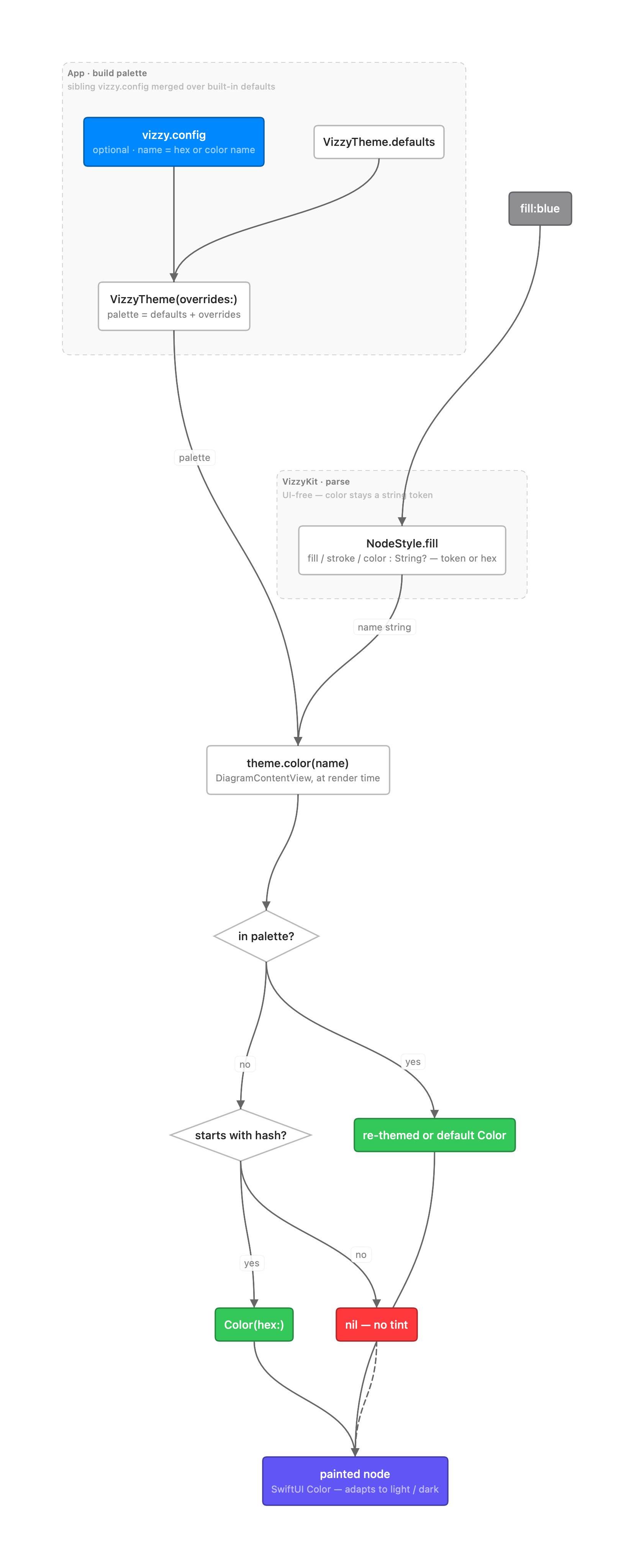
Section titled “How a color name resolves”A color stays a plain name until the moment it’s drawn. VizzyKit parses the diagram and
keeps fill / stroke / color as unresolved strings on each node; the app builds a
palette by merging your vizzy.config over the built-in defaults, then resolves each name
at render time. The order is config override → built-in default → raw #hex → none —
and the final SwiftUI color adapts to light / dark on its own.
Assets
Section titled “Assets”Images are entirely optional. You may reference files from vizzy/assets/, but no diagram
needs them.
To go the other way — turning a diagram into an image for a README or web page — use the
vizzy CLI, which renders each diagram to a PNG in vizzy/assets/.