
Git graph
Best for explaining a branching workflow — commits run along a time axis, each branch gets its own coloured lane, and merges curve back in.
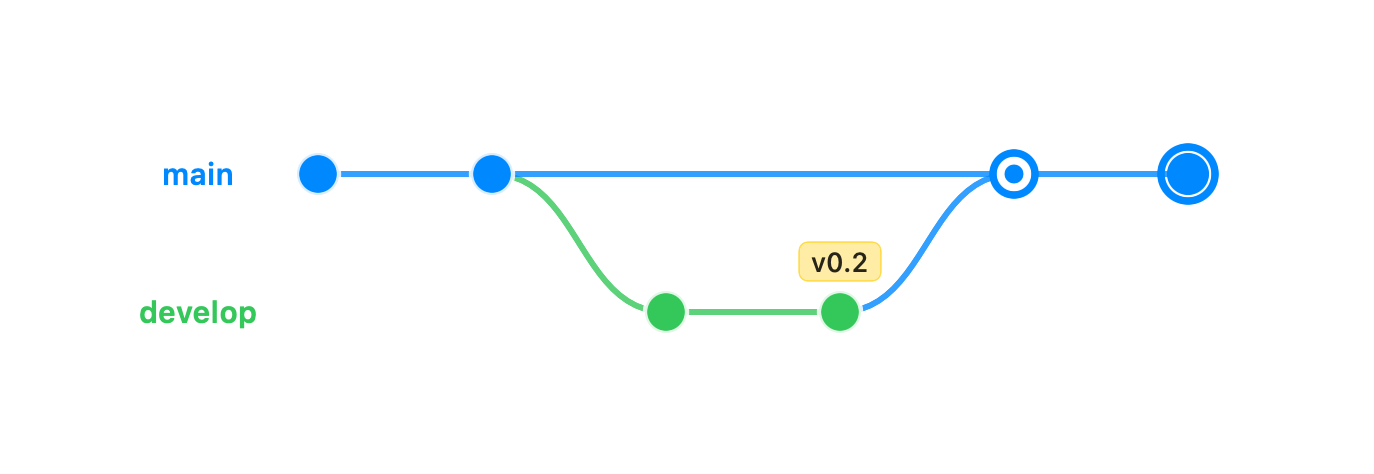
gitGraph commit id: "init" commit branch develop checkout develop commit commit tag: "v0.2" checkout main merge develop commit type: HIGHLIGHTThe first keyword is gitGraph. Each command on its own line builds the history in order:
commit— adds a commit to the current branch. Options:id: "name"(otherwise one is generated),tag: "v1.0"(drawn as a small flag above the dot), andtype: NORMAL | HIGHLIGHT | REVERSE(a bold ring, or an ✗ for a revert).branch <name>— forks a new lane from the current commit and switches to it.checkout <name>/switch <name>— makes<name>the current branch.merge <name>— merges<name>into the current branch as a two-parent commit, drawn with a connecting curve back to the merged lane. Accepts atag:too.cherry-pick id: "…"— adds a commit on the current branch referencing another.
Every commit takes the next slot along the time axis (left to right by default); each
branch takes the next lane down. Add gitGraph TB: on the first line to run time downward
instead, with lanes side by side. Unrecognized fields are ignored, so a partial graph still
renders.